
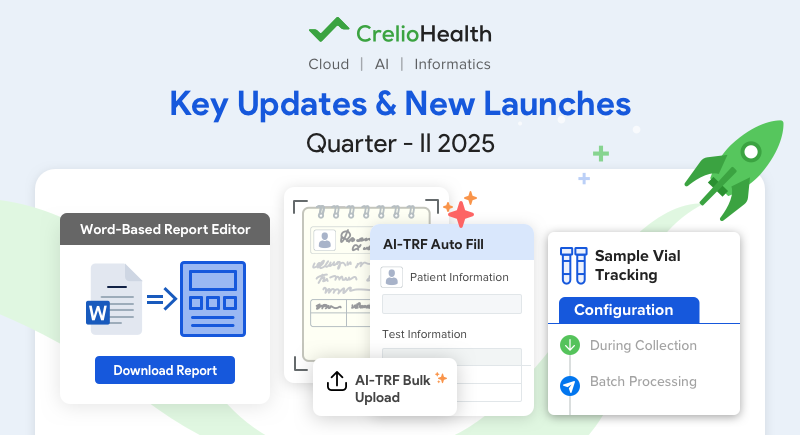
As we move through the first half of 2025, our clinical laboratory solutions continue to evolve rapidly. At CrelioHealth, we understand that modern laboratories face unprecedented challenges like increasing test volumes, shrinking turnaround times, complex finance operations, and the constant pressure to maintain flawless accuracy. That’s why our latest updates and new launches not only improve your workflows but also fundamentally transform how your laboratory operates.
Here’s a roundup of the latest features and enhancements that are transforming lab operations for teams worldwide:
1. AI-Powered Patient Registration: Supercharge Your Workflow Efficiency
With recent updates to patient requisition forms worldwide, it’s crucial to recognize how even modest automation can streamline your daily operations and enhance compliance.
I. Bulk Upload Patient Documents For Faster Registration
Feature Highlight : Upload multiple test requisition forms (TRFs), ID proofs, insurance cards, or driving licenses at once, and let AI handle the scanning and data extraction.
The bulk upload feature in AI-TRF Scan enables you to upload bulk documents for multiple patients in a single step. Instead of registering patients one by one, users can upload a batch of TRFs or other documents, and the system will automatically scan, detect, and prepare each file for review and order creation.
How It Works:
- Upload Documents : Select or drag and drop multiple files (PDFs, JPGs, PNGs) at once. Each file is assigned to a single patient.
- Backend Processing : Documents are processed by our AI automatically, allowing you to carry out with other tasks.
- Review Documents : Processed files appear in the Pending Review tab. Open each file to review the extracted patient data.
- Verify & Register : Confirm patient details, make necessary edits, and save to create the new patient record.
II. Auto-Fill Patient Document Details: Smarter, Error-Free Data Entry
Feature Highlight : Automatically extract key information from patient documents accurately and auto-fill it in your systems.

Why It Matters:
- Saves Time : Upload all necessary documents in one go.
- Boosts Accuracy : Automatic data extraction reduces manual entry errors.
- Minimizes Back-and-Forth : Fewer requests for missing information.
- Enhances Efficiency : Complete and accurate registrations every time.
2. Lab Form Data Export: Turn Insights into Action
Feature Highlight : Effortlessly export all patient and lab data captured throughout the workflow for quick analysis and reporting.
You can now effortlessly export all captured data, whether it’s patient details collected during booking, AOEs entered by your lab team, or any other forms completed throughout the report processing.

Why It Matters:
- Clinical Clarity : Imagine a doctor needing to review whether a patient was on medication that could impact test results. With just a few clicks, they can export the relevant information and make informed decisions without delay.
- Operational Insights : Lab managers can instantly generate reports, such as how many patients reported a history of disease before undergoing a specific test. This empowers data-driven decision-making and quality assurance.
- Streamlined Finances : The billing team can easily verify if all required consents and documentation were collected before submitting insurance claims, reducing the risk of delays or rejections.
3. Sample Vial Tracking: End-to-End Sample Integrity
Ensure each patient’s sample vial is accurately tracked, labeled, and identified at every step, minimizing errors and streamlining your processing with these useful updates.
I. Sample Vial Count Tracking
Feature Highlight: Track every sample vial from collection to analysis with a robust tracking system.
How It Works :
- Configure maximum vial quantities per sample and minimum requirements per test.
- Record the number of vials collected during sample collection or billing.
- Receive instant alerts if vial quantities are insufficient for ordered tests.
- Display vial counts during accessioning for easy verification.
- Track vial counts during batch transfers to ensure accurate lab-to-lab sample handling.
Why It Matters :
- Reduces Errors & Confusion : Accurate vial tracking minimizes sample mix-ups, missing vials, and insufficient samples, ensuring reliable test results and fewer manual follow-ups.
- Enhances Efficiency : Clear vial counts at every stage from collection to lab receipt, streamlines accessioning, batch processing, and lab-to-lab transfers.
- Supports Compliance & Documentation : Maintaining detailed vial records helps meet regulatory standards and facilitates audits by providing a clear chain of custody for each sample.
Need More Help? Read Help Article
II. Efficient Sample Identification with Multiple Barcode Printing
Feature Highlight : Print multiple barcodes per sample with customizable settings to improve vial tracking.
Configuration Options :
- Same as Vial Count : Automatically print barcodes based on the number of vials collected for each sample.
- Ask When Printing : Prompt the user to enter the desired number of barcodes each time a print action is performed.
Why This Matters :
- Improved Sample Tracking : Multiple barcodes per sample reduce labeling errors and ensure each vial or container is uniquely and accurately identified at every stage.
- Workflow Flexibility : Labs can customize barcode printing to match their exact processes, whether handling single or multiple vials per test.
- Operational Efficiency : Bulk printing options save time and minimize manual steps, especially when processing large batches of samples.
4. Unique Auto-Generated Client Codes: Flawless Client Identification
Feature Highlight : Automatically assign unique codes to each client, eliminating manual entry and errors.
Every client account can now receive a unique, auto-generated code, eliminating errors and preventing duplicate records. With just one click, you can also generate codes for all existing accounts, allowing you to standardize your database instantly.
Choose the code format that fits your workflow best :
- State-Based Prefix (Great for regional labs)
- Texas Medical → TX-1001 • California Diagnostics → CA-1002
- City-Based Prefix (Helpful for multi-location labs)
- Mumbai Health Center → MUM-2001 • Delhi Labs → DEL-2002
- Industry-Based Prefix (Useful for specialized labs)
- Hospital-Based → HOSP-3001 • Corporate Wellness → CORP-3002
- Custom Identifiers (Great for personalized tracking)
- First 3 letters of Lab Name + Number – • “Elite Health Labs” → EHL-4001 • “Prime Diagnostics” → PRD-4002
Check our video: Auto Organisation Code Generation Demo
Why It Matters :
- No More Duplicates : If your front desk team accidentally registers the same client under different names (like “Pro Health” and “Pro Health Labs”), the system assigns a consistent code (e.g., PH-1001), ensuring each account is unique from the start.
- Accurate Financial Records : The finance team can easily match invoices and records, even if the same clients are listed under different names.
5. Advanced Access Control and Custom Reporting
Advanced Access Control and Custom Reporting enhance lab security and provide tailored insights for better decision-making. Know more:
I. Custom Financial Report Template
Feature Highlight : Lab admins can create unlimited custom templates for financial reports.

Why It Matters :
- Configurable Reporting : Design multiple custom reports with preferred columns and specific analyses, then save these as new templates
- On-demand Analytics : Save time by quickly generating the reports you use most, with all preferred columns and analyses pre-configured.
- Uniformity : Ensure every team member accesses and analyzes financial data in a uniform format.
II. Critical Report Approval – Access Control
Feature Highlight : Securely manage user-level access control for approving critical or abnormal reports.

Why It Matters :
- Protects Patient Safety : Ensures that only authorized and qualified personnel can approve reports with critical or abnormal findings, minimizing the risk of errors and safeguarding patient outcomes.
- Reduces Risk of Unauthorized Actions : Prevents accidental or unauthorized approval of sensitive reports, reducing compliance risks and supporting regulatory standards.
- Promotes Clarity : Team members instantly know who is responsible for critical approvals with a clear audit trail, streamlining communication and reducing confusion in high-stakes situations.
6. Microsoft Word-Based Report Editor for Radiology Reports
Feature Highlight : Generate and edit radiology reports using a Microsoft Word-based editor directly within your lab system.
With this new feature, your team can create detailed, professional, and standardized reports with ease. It reduces the learning curve, ensures consistency, and enhances collaboration between radiologists and referring clinicians.

Watch the complete video here- Demo Link
Why It Matters :
- Familiar Interface : Radiologists can use the tools and formatting options they already know from Microsoft Word, reducing training time.
- Full Formatting Control : Customize fonts, spacing, tables, and layouts for highly professional and standardized radiology reports.
- Versatile Output : Effortlessly download or preview reports as Word documents or PDFs before finalizing, supporting various workflow needs.
7. Hide Prices for Lab Login Users: Enhanced Data Privacy
Feature Highlight : Control access to pricing information by hiding prices from users with lab logins.

This new feature allows labs to customize user permissions, protecting confidential information and ensuring that staff only see what’s relevant to their role. It supports better data governance and aligns with privacy best practices.
Need More Help? Read Help Article
Why It Matters :
- Protects Sensitive Financial Data : Ensures that confidential pricing, discounts, and B2B rates are only visible to authorized personnel, reducing the risk of data leaks or misuse.
- Reduces Human Error : Prevents accidental sharing or editing of sensitive pricing details by staff who do not require this information for their roles.
- Stringent Access Control : Helps labs enforce strict separation of duties and maintain clear boundaries between financial and non-financial responsibilities.
8. Live Location Tracking of Phlebo from the Patient App
Feature Highlight : Allows patients to view their phlebotomist’s real-time location directly within the Patient App
How It Works :
- Real-Time Map View : Patients can see their assigned phlebotomist’s current location on a map within the app.
- Estimated Time of Arrival : The app displays how long it will take for the phlebotomist to reach the patient’s location, helping patients plan accordingly.
Why It Matters :
- Reduces Anxiety and Uncertainty : Patients gain peace of mind by knowing exactly when to expect their phlebotomist, eliminating guesswork and waiting.
- Minimizes Missed Appointments : Real-time updates help patients stay prepared and reduce the chances of missed or delayed appointments due to unforeseen circumstances.
- Builds Trust & Convenience : Keeping patients informed at every step enhances their trust in your service and improves the overall patient experience.
Wrapping Up CrelioHealth’s Q2 2025 Innovations
At CrelioHealth, our mission is to deliver the most advanced and impactful features that transform everyday lab operations into a streamlined, efficient, and effortless experience. By continuously innovating, we aim to empower your team with tools that accelerate workflows and improve patient care.
Your feedback is the cornerstone of our progress, inspiring us to build solutions that truly resonate with your needs. We are truly grateful for your trust and partnership.
Stay tuned for more updates, and keep sharing your valuable insights! We’re here to help you grow.

