
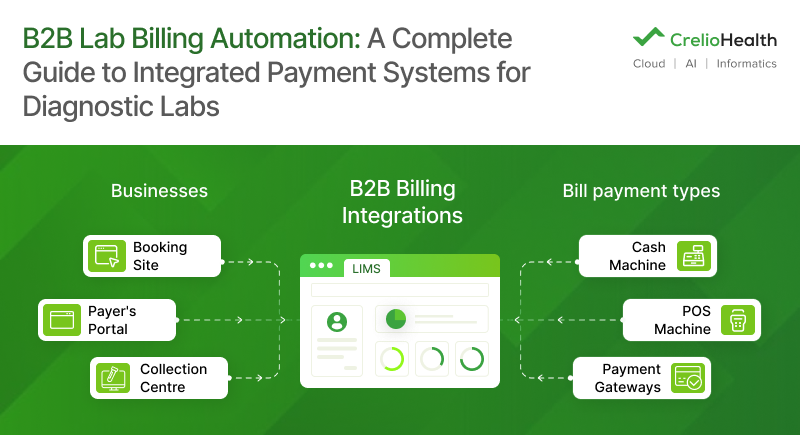
A mid-sized reference lab often manages payments from walk-in patients, hospital contracts, collection centers, home collections, and insurance claims – all at the same time. Many of them have two full-time employees who spend their days reconciling payments and updating spreadsheets instead of focusing on higher-value work. The problem isn’t staffing; it’s outdated billing systems.
The U.S. laboratory market has made billing even more challenging. PAMA-driven reimbursement cuts, outpatient claim denial rates of 10–15%, and an average of $25 in staff time to rework each denied claim all increase the cost of manual billing. The No Surprises Act and the growing adoption of high-deductible health plans add another layer of complexity. This makes payer-specific billing accuracy essential to avoid delays, denials, and revenue loss.
This guide shows how B2B lab billing automation simplifies payments across hospitals, collection centers, and insurance providers, and what to look for when choosing a billing solution. It’s built for lab leaders who want to eliminate manual reconciliation and get paid faster.
Why Generic POS Systems Fail Diagnostic Labs
Most labs are running a POS billing solution built for someone else’s business.
Retail counters and hospital front desks need a system for one transaction, one payer, one moment. However, in labs, there exist five separate billing relationships exist at once, each with its own rate card, payment schedule, and compliance rules. Force all five through a narrow retail pipe and something gives.
Three problems show up almost immediately:
- No concept of payer type: Retail and hospital POS systems were built for point-of-sale exchange, not multi-payer invoicing. They have no idea what a “collection centre rate” or a “contracted hospital price” even is.
- Billing lives outside LIMS: Every completed test requires a manual step before its billing. That manual step is exactly where charges go missing.
- Three disconnected records: The payment gateway, the LIMS, and the billing ledger each keep their own version of the truth. Nobody has one accurate picture of what’s owed, by whom, or when.
The result: The system captures a transaction, but it never captures what needs to be invoiced. Not the tests performed, or the responsible payer, or the contracted rate, or the audit trail an inspector will eventually ask to see.
The 5 Billing Streams Every Diagnostic Lab Must Manage
Irrespective of size, every healthcare center must be readily accessible for at least these five billing streams:
- Walk-in and OPD patient payments: Cash, card, UPI, or, in the U.S., card and portal payments against co-pays and deductibles.
- Collection center bulk invoicing: Per-patient or per-batch billing against a franchise rate card.
- Hospital and corporate B2B clients: Credit-period billing against negotiated contract pricing.
- Home collection charges: Logistics fees and test costs are billed as a single line item.
- Insurance and TPA claims: Submission, adjudication follow-up, denial management, reconciliation.
If your lab POS system can’t separate these five streams on its own, it will eventually blend them. And blended billing is exactly where revenue disappears without anyone noticing.
| Generic POS | Lab-Specific Billing System | |
|---|---|---|
| Multi-payer support | One payer per transaction | Five payer types, handled in parallel |
| LIMS integration | None, or a bolt-on middleware layer | Native, real-time |
| Reconciliation | Manual, spreadsheet-based | Automated payment-to-invoice matching |
| B2B invoicing | Not supported | Contract pricing, credit terms, batch cycles |
| Compliance | Generic tax reporting | Audit trail built for CLIA and CAP review |
| Real-time tracking | Daily or weekly batch reports | Live AR dashboard by payer |
What Is B2B Lab Billing Automation?
B2B lab billing automation connects your LIMS, billing rules, and payment gateway into one workflow. Every completed test triggers the correct invoice to the correct payer, at the correct rate, without anyone re-keying a single line.
Speed isn’t the real win here. The real win is that the system already knows three things a billing clerk currently has to figure out manually, hundreds of times a day, which are:
- Who pays: Patient, hospital, collection centre, or TPA.
- How much they owe: Contracted rate, discount tier, tax treatment.
- When the invoice goes out: Immediately, in a daily batch, weekly, or on monthly credit terms.
Consider a lab where a single test result feeds four different billing destinations depending on who ordered it. Without automation, someone makes that judgment call by hand, over and over, all day. Every manual judgment call is a place where an error can hide. Automate it, and the decision happens the same way every time.
Key Components of a Lab Billing Automation System
The most essential components of a lab billing automation system are:
- LIMS/LIS integration layer: Syncs completed test orders to billing in real time, not overnight.
- Billing rules engine: Applies payer-specific pricing, discounts, and tax rules automatically.
- Payment gateway: Handles UPI, card, patient portal, and bank transfer in one system.
- Reconciliation module: Matches incoming payments to open invoices without using spreadsheets.
- Reporting dashboard: Shows live AR, collection rate, and outstanding balance by payer.
LIMS billing integration is designed to run all five steps on one connected system instead of five disconnected tools. So, there are fewer hand-offs, fewer places for revenue gaps, and an audit trail that holds up when CAP or a payer comes calling.
How Does an End-to-End B2B Lab Payment Integration Work?
B2B lab payment integration connects your billing system to every touchpoint. It reconciles revenue trails from the moment a test is ordered to the moment payment lands. But the mechanics change depending on who’s paying, which is exactly why a one-size-fits-all POS setup falls apart. Three flows matter most.
Hospital & Clinic Credit Billing Workflow
- The hospital/clinic sends a requisition. The lab processes the panel. The system generates a batch invoice at the negotiated contract rate.
- The invoice goes out on the agreed cycle: daily, weekly, or per batch.
- The system tracks the credit period and sends payment reminders automatically as the due date nears.
- Payment arrives, matches the invoice automatically, and the hospital’s or clinics’ AR balance updates in real time.
This is where manual systems break the hardest. Track a 45-day credit term with a tiered volume discount by hand across dozens of monthly invoices, and something will slip. Every missed tier adjustment is margin the lab never gets back.
Collection Center Franchise Billing Workflow
- The collection centre registers the patient and collects the sample.
- LIMS tags the test order with the collection center’s ID.
- The billing engine applies that center’s contracted rate automatically, often 15 to 30% different from the standard patient rate.
- A per-patient or consolidated invoice is generated without anyone touching it.
- Payment matches automatically, and the centre sees its outstanding balance through a self-service portal.
For labs running a franchise or partner-collection-centre model, common in both the U.S. reference lab markets, this single workflow often accounts for the largest chunk of unreconciled revenue when it’s still done by hand.
Insurance & Corporate Billing Workflow
- The lab verifies the patient’s insurance or corporate eligibility before processing the test.
- The billing system applies the payer’s contracted pricing and generates the claim or invoice automatically.
- Claims are submitted electronically, while corporate invoices follow an agreed billing cycle.
- The system tracks claim status, flags denials or pending payments, and sends follow-ups when needed.
- Once payment is received, it matches the claim or invoice automatically and updates the payer’s outstanding balance in real time.
Insurance and corporate billing involve multiple payer contracts, reimbursement rules, and approval requirements. Managing them manually leads to denied claims, delayed reimbursements, and hours spent reconciling payments. Automation keeps claims moving, improves collection rates, and gives finance teams complete visibility into outstanding receivables.
All three point to the same principle: B2B lab payment management only works when the billing engine decides which rate card and cycle apply to which workflow, not a person. If you’re wondering how to integrate POS financing into medical services, start here, not with a payment terminal. Start with a rules engine that understands the contract logic before the transaction even happens.
What Payment Methods Should Your Lab’s Billing System Support?
Your payment system needs to match where your payers pay. Not where a legacy POS vendor assumed they would.
The split that matters most is patient-facing versus B2B corporate:
- Patient-facing collection is about speed: Card, UPI, QR code, and portal payments need to clear in seconds.
- B2B corporate collections are about terms and traceability: Invoice-plus-bank-transfer, bulk billing cycles, and TPA claims need to survive a credit agreement and, eventually, an audit.
A lab POS for billing that treats both the same way underperforms at both.
Complete Payment Method Checklist for Diagnostic Labs
| Payment Method | Applicable Payer Context |
|---|---|
| POS terminal (card / contactless) | Walk-in patients, OPD |
| UPI (Unified Payments Interface) | Walk-in patients and home collection |
| QR code payments | Patient self-service, mobile billing |
| Online patient portal/app payment | Patient billing, home collection follow-up |
| Corporate invoice + bank transfer | Hospitals, corporates, institutional B2B clients |
| Bulk billing cycle invoicing | Collection centres and franchise labs |
| TPA / insurance claim submission | Insurance-covered tests |
| EMI / instalment plan | High-value packages (full-body checkup, oncology panels) |
Labs still route every payment type through one card terminal, losing money twice. Once from patients who abandon payment because their preferred method isn’t there, and again from B2B clients whose invoice-and-bank-transfer cycle has zero automated tracking.
Automating Lab Billing Reconciliation: Eliminating the End-of-Day Bottleneck
Reconciliation is where most lab billing problems hide. Matching payments to invoices by hand across five payer types, each on its own timing and format, and errors slip through. They usually surface weeks later, once the money is much harder to chase down.
The gap starts small. A UPI payment lands without a clear reference number. The hospital sent one lump payment covering three separate invoices. The collection centre payment comes up short by a rounding difference that nobody catches until month-end. Multiply that across hundreds of daily transactions, and the billing manager’s job turns into archaeology instead of accounting.
Automated payment-to-invoice matching fixes this. Every incoming payment gets checked against open invoices by payer, amount, and reference number in real time. Anything that doesn’t match cleanly gets flagged the same day, not discovered a month later during an audit.
What a Fully Reconciled Lab Billing Day Looks Like
- Morning: The system generates an overnight payment summary by payer type.
- Throughout the day: every payment auto-matches to its invoice as it clears.
- Real-time: unmatched payments and overdue invoices get flagged automatically.
- End of day: an automated reconciliation report lands in the billing manager’s inbox.
- Always on: The AR dashboard shows live outstanding balances by payer and days overdue, the same metrics HFMA and MGMA use to benchmark revenue cycle health industry-wide.
This is what automating lab orders and billing reconciliation buys you. The gap between “test performed” and “payment confirmed” shrinks from weeks to hours. Lab payment reconciliation stops being a monthly fire drill.
7 Features to Look For in Lab Billing and POS Software
Not all billing software is built for diagnostic labs, and the gap shows up quickly once you start comparing vendors. Here are seven capabilities that separate purpose-built B2B lab billing software from a repurposed retail system.
- Native LIMS/LIS integration: Not a bolt-on API connector. Test orders trigger billing automatically, with no manual export or import step in between.
- Multi-channel payment support: UPI, cards, patient portal, bank transfer, and insurance claim submission, all within one platform.
- B2B invoicing and credit management: Contract pricing, credit limits, and invoice scheduling are configured per client, not tracked in a spreadsheet.
- Automated reconciliation engine: Payment-to-invoice matching that runs continuously and flags exceptions without manual work.
- Real-time payment tracking dashboard: AR by payer, collection rate, and overdue alerts are visible the moment they change.
- Compliance and audit trail: Tax reporting, invoice logs, and documentation that will hold up under a CLIA, CAP, or payer audit.
- Patient billing portal: Mobile-accessible, with payment link sharing and instalment options for high-value panels.
Questions to Ask Your Lab Billing Software Vendor
- Does it integrate natively with our LIMS, or does it need a middleware layer?
- Can it manage B2B hospital and collection centre billing separately from patient billing?
- What reconciliation automation comes standard, and what gets sold as an add-on?
- How does it handle multiple contracted rates per client or payer?
- What compliance reporting is built in? Audit trail, tax formats, TPA claim formats?
If a vendor dodges the middleware question, that tells you the integration is shallower than the demo led on. Billing automation is also just one piece of a broader lab revenue cycle strategy, worth reading alongside CrelioHealth’s lab revenue cycle management guide and billing platform buyer’s guide before you shortlist anyone.
The Business Case for Lab Billing Automation
Lab billing automation pays for itself quickly. The real question isn’t whether to automate. That’s how much revenue your current manual system costs you every month, quietly, without ever showing up as its own line item.
Manual billing costs a lab in three places:
- Labour hours. Your billing manager spends time on reconciliation instead of managing actual exceptions.
- Error correction. Staff time spent fixing mistakes that have already delayed a payment.
- Bad debt. As a percentage that creeps up every quarter, reconciliation falls further behind.
HFMA’s benchmarking data consistently links manual, high-touch billing to longer days in AR and higher write-off rates compared to automated, rules-based systems. These are the exact metrics a lab CFO is already being judged on.
The ROI shows up fast and is trackable within one quarter:
- Fewer AR days outstanding
- Higher collection rates
- Fewer billing disputes reaching escalation
- Staff hours redirected from reconciliation to actual revenue cycle work
None of that happens as a side effect of a shiny new LIMS feature. This happens because billing automation gets treated as its own strategic lever, not an afterthought bolted onto the rest of the system.
Quick ROI Calculation Framework for Lab Billing Automation
- Leakage estimate: monthly billing errors × average invoice value
- Labour saving: reconciliation hours per month × staff cost rate
- Collection rate lift: current collection rate vs. post-automation benchmark (a realistic target is +5 to 10 percentage points)
| Manual Billing (Monthly Estimate) | Automated Billing | |
|---|---|---|
| Reconciliation labour | 60–100+ staff hours | Minutes of exception review |
| Billing errors/leakage | 2–5% of gross revenue | Under 1% |
| Days in AR | 45–60+ days | 20–30 days |
| Collection rate | Baseline | +5–10 percentage points |
Run this math against your own numbers before you look at a single vendor. It’s the fastest way to turn “we should probably modernise billing eventually” into a figure your CFO will actually act on.
Frequently Asked Questions
What is POS billing in a diagnostic lab?
POS billing in a diagnostic lab means using a point-of-sale system to collect and record payments. Unlike retail POS, a lab pos for billing has to handle patient, collection centre, hospital, and insurance payments in parallel, each on its own rates and terms, instead of one simple transaction type.
How do I integrate a POS system with my lab’s LIMS?
Two paths exist to integrate a POS system with my lab’s LIMS. A native LIMS billing module keeps billing logic inside the same system as test orders. An API-connected POS sits on top of the LIMS instead. Native integration wins almost every time because it removes the manual export and import step that causes most missed charges.
What is B2B lab payment integration?
B2B lab payment integration is a process that automates billing and payment workflows between a lab and its B2B clients: hospitals, collection centres, and corporates. In practice, that means batch invoicing at contracted rates, automatic credit-period tracking, and auto-reconciliation as B2B payments come in.
Can one billing system handle both patient billing and B2B corporate invoicing?
Yes. Purpose-built B2B lab invoicing software keeps separate billing rules for each payer type, different rate cards, credit terms, and invoice formats, while unifying reconciliation and reporting into a single AR dashboard.
How does automated billing reconciliation work in a lab setting?
Payments arriving through UPI, card, bank transfer, or TPA remittance match automatically to their invoices through the billing engine. Anything that doesn’t match cleanly gets flagged for review, and an end-of-day reconciliation report is generated on its own, replacing the spreadsheet matching most labs still do by hand.
Conclusion
Manual billing is the hidden cost most lab directors underestimate. Not because the numbers don’t exist, but because they’re scattered across five disconnected payment streams instead of sitting in one dashboard. Integrated lab billing automation closes that gap. It connects every completed test order to final collection across patients, hospitals, collection centres, home collection, and insurance, with no manual hand-off anywhere in between.
Before you choose a system, ask three questions:
- Does it integrate natively with your LIMS?
- Can it manage B2B and patient billing separately while reconciling both automatically?
- Does it include a real reconciliation engine, not just a payment gateway bolted onto your existing workflow?
If the answer to any of those is no, you’re looking at a POS terminal, not a billing system built for how labs actually run.
See how CrelioHealth’s integrated billing handles all five payment streams in a single platform. Book a lab billing automation demo and walk through it against your own test menu and payer mix.

